3-D Data Visualization
Full Article
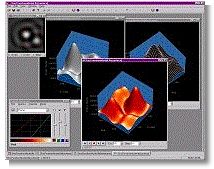 This
brief illustrates some of the 3-D visualization capabilities in
Mira Pro x64. Here, we show how Mira's 3-D visualization tools can be used to better
understand numerical models that are part of almost any academic or
R&D imaging application.
This
brief illustrates some of the 3-D visualization capabilities in
Mira Pro x64. Here, we show how Mira's 3-D visualization tools can be used to better
understand numerical models that are part of almost any academic or
R&D imaging application.
To load your model data into Mira, you need to know only its
width, height, and numeric data type. Your model doesn't need to be written
to any particular image format, and Mira supports real and integer arrays
ranging from 8 to 64 bits per pixel. Once the 2-D array is opened in Mira, a
superb 3-D rendering is just a button click away. To help understand your
model, you can move the viewpoint around the data, change the
characteristics of the light source, switch to an intensity rendering, even
apply a pseudo-color palette as a function of array value or reflectivity.
If that's not sufficient, you can set the view rotating while you scrutinize
its topology. And, if you need, say, 3 copies rotating simultaneously but
viewed from different elevations, then that too is easy to do.