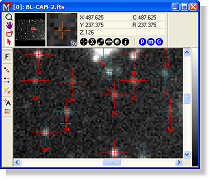
This Brief defines the parameters measured using the MExtract package. Source Extraction is also known by the names "image segmentation" and "image labeling" in various applications. This procedure identifies, or detects individual objects or image features in one or more images and computes some 40 properties for each detection. Source Extraction provides numerous options for controlling the detection and processing of information. The procedure may also be used to detect objects or features that are common to an image set or that vary among the images. Source extraction is handled using the Source Extraction package in Mira Pro x64. This Brief describes the measured properties and discusses how various properties are affected by the threshold sensitivity.
Properties Listed in the Report
The properties in the table below are tabulated at the end of the Source Extraction pipeline. They may be listed in the Source Extraction Results window. Additional properties also are measured and are included if saving the results to a text file (see the second table below).
|
# |
A sequential number for the measurement |
|
Image |
The name of the image that was measured |
|
Obj |
The source number. If sources touch and are merged during the detection process, one of the numbers is discarded, making the Obj values generally not a continuous sequence. |
|
<X> |
The mean X position, measured in world coordinates. If Precision Centroid or Precision FWHM is checked on the Post Process page, this is measured in the same way as an interactively marked centroid using the settings on the Centroid page. |
|
<Y> |
The mean Y position, measured in world coordinates. If Precision Centroid or Precision FWHM is checked on the Post Process page, this is measured in the same way as an interactively marked centroid using the settings on the Centroid page. |
|
Col |
The mean Column position, measured in pixel coordinates. If Precision Centroid or Precision FWHM is checked on the Post Process page, this is measured in the same way as an interactively marked centroid using the settings on the Centroidpage. |
|
Row |
The mean Row position, measured in pixel coordinates. If Precision Centroid or Precision FWHM is checked on the Post Process page, this is measured in the same way as an interactively marked centroid using the settings on the Centroid page. |
|
Lum |
The total luminance of the source above the background. If you think of pixel value as defining a 3 dimensional surface, the Lum value is the volume of the surface above background. |
|
Mean Lum |
The total luminance (Lum value) divided by the area. |
|
Std Dev |
The standard deviation of the luminance. |
|
Ellip |
The ellipticity, measured as 1 – (minor axis / major axis). |
|
Angle |
The angle of the major axis relative to the positive X axis (0 degrees), increasing through the positive Y axis (90 degrees). |
|
Area |
The area, in pixels, of the source above the threshold. This is threshold dependent. |
|
Maximum |
The maximum luminance. This is the pixel value of the highest pixel inside the source. |
|
Minimum |
The minimum luminance. This is the pixel value for the threshold value above the background. |
|
FWHM |
The Full Width at Half maximum brightness. This measures the point spread function of the source profile. |
|
CI |
Concentration Index. This is the ratio of the Effective Diameter divided by 2 times the radius of gyration. The Effective diameter is the diameter of a circle having the same area. The radius of gyration is the radius for the second moment of the intensity distribution (analogous to the moment of inertia of a rotating mass distribution). This is threshold dependent. |
|
Major Axis |
The major axis length in units of pixels. This is threshold dependent. |
|
Minor Axis |
The minor axis length in units of pixels. This is threshold dependent. |
|
Kurtosis |
The source profile kurtosis. This measures the "flatness" of the luminance distribution. |
|
X Skew |
The source profile skewness in the X direction. This measures the asymmetry of the luminance distribution. |
|
Y Skew |
The source profile skewness in the Y direction. This measures the asymmetry of the luminance distribution. |
|
Background |
The background value evaluated at the average position of the source (at <X> and <Y>). |
|
Mag (Aperture Photometry) |
The brightness of the source above its local background. It is integrated within an elliptical aperture surrounding the object. The Zero point value specified in the Aperture Photometry Setup dialog is also applied. This value and its related measurements are reported only if the Aperture Photometry option is checked on the Post Process page. |
|
Error (Aperture Photometry) |
The uncertainty in the photometric brightness or magnitude. This is computed using the signal and an error estimate based on variation in the pixel values inside the background annulus surrounding the source. |
|
Error(T) (Aperture Photometry) |
The theoretical estimate of the uncertainty in the photometic brightness or magnitude. This is computed using signal at each point along with the gain, readout noise, and exposure time for the image. |
|
Net Count (Aperture Photometry) |
The total signal of the source above its local background. This is also known as "count volume". It is integrated within an elliptical aperture surrounding the object, and is used to compute the magnitude. |
|
S/N (Aperture Photometry) |
The Signal To Noise ratio for the detected signal inside the aperture that measures the magnitude and net count. |
|
Bg Local (Aperture Photometry) |
The precision background measured from pixels inside the annulus between the inner and outer background apertures. This is more accurate for a precision luminance measurement than is obtained using the Background surface value at the position of the source. This value is effective at the center position of the object. |
Additional Properties
The following quantities are listed in the text file using the [Save] button on the Procedure page. They are not reported in the Report Window like the properties listed above. Except for the two additional FWHM results, all the properties listed below are obviously dependent on the threshold value.
|
FWHM Peak (Precision FWHM) |
The Peak value (above background) from the FWHM calculation. This is measured only if FWHM is selected in the post processing options. This is not threshold dependent. |
|
FWHM Bg (Precision FWHM) |
The background value from the FWHM calculation. This is measured only if FWHM is selected in the post processing options. This is not threshold dependent. Compare its value with the computed background value based on the Background strategy page. |
|
Min X |
The minimum Column position of the source. |
|
Max X |
The maximum Column position of the source. |
|
Min Y |
The minimum Row position of the source. |
|
Max Y |
The maximum Row position of the source. |
|
X at Min Y |
The Column position at the minimum Row position of the source. |
|
X at Max Y |
The Column position at the maximum Row position of the source. |
|
Y at Min X |
The Row position at the minimum Column position of the source. |
|
Y at Max X |
The Row position at the maximum Column position of the source. |
|
X at Min Lum |
The Column position at the minimum Luminance of the source. |
|
X at Max Lum |
The Column position at the minimum Luminance of the source. |
|
Y at Min Lum |
The Row position at the minimum Luminance of the source. |
|
Y at Max Lum |
The Row position at the minimum Luminance of the source. |
Notes About Threshold Sensitivity
Note that some depend to varying degrees on the choice of the threshold value. The threshold is set on the Detect page of the Source Extraction Preferences dialog:
- Some quantities, such as Area and CI, are completely dependent upon the threshold value, since the threshold defines which pixels are included in the source. These quantities will give completely different answers for different threshold levels.
- Other quantities, such as Ellip and Angle, use the included pixels as an estimator of their true value hence they are sensitive to varying degrees on the chosen threshold.
- As a hybrid of the two cases, the major axis and minor axis values are dependent on the threshold, but their ratio, as presented in the ellipticity (Ellip item) is an estimate of the true value for the object.
- The Post Process Precision FWHM measurements are not sensitive to the threshold when measuring unresolved sources (in Mira Pro; Mira Pro x64 offers options for both resolved and unresolved sources).
- The Post Process Aperture Photometry measurements are not not sensitive to the threshold.