Since 2005, Mira AL was a staple of astronomy educators, students, and amateur astronomers doing real science on a tight budget. It provided a critical core of sophisticated tools for extracting scientific results from digital images. Mira AL x64 now replaces 32-bit Mira AL with many more features and a true 64-bit application that utilizes the full 64-bit memory space and provides greater processing speed.
Application areas: Science education, public outreach, amateur astronomy.
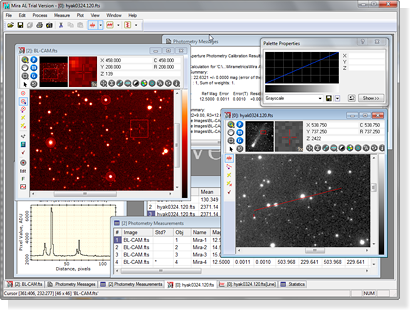
Mira AL x64 showing images, enhancement, photometry, plotting, and
measurements
Mira AL is designed for amateur astronomers, educators, and students who want to visualize and measure scientific data but have only simple or occasional needs for image calibration and data reduction. To add tools for image calibration, processing, enhancement, and customized scripting, see Mira Pro x64.
If you are an astronomy or science educator considering options for teaching astronomy, look no further! Depending on your needs, Mira AL can be installed for one user per machine, with separate accounts for multiple users' on the same machine, or on a server.
Mira AL employs scientifically accurate methods and innovative GUI techniques that allow users to measure and visualize data in ways that cannot be done using software derived from graphics arts, photo viewing, or camera controlling applications. Despite its modest price, Mira AL truly is "industrial strength" scientific software, and it is remarkably easy to learn and use. Mira AL x64 embodies what we've learned during 30 years in the business and was developed with input and review by science educators and EPO professionals.
Mira AL x64 includes many of the highly acclaimed measurement and visualization tools in our heavy-duty astronomical research software Mira Pro x64. But Mira AL x64 is by no means light on capability! While Mira AL x64 provides tools for bias, dark, flat, and cosmetic correction of CCD images, we did not complicate it with the more more complex tools in Mira Pro and Mira Pro x64. The result is software that can be used to advantage at the middle school level yet offers advanced capabilities that satisfy the needs of introductory college education.
One year of maintenance is included; after one year, discounted annual maintenance is available to provide tech support and keep your software current.
Key Features
- Display, plot, animate, blink, and visually enhance images in grayscale, color, and pseudo-color.
- Measure high-precision coordinates, distance, angle, brightness, and statistics, using both pixel units and world coordinates.
- Detect fainter objects and increase the statistical significance of measurements using image combining and normalization techniques.
- Correct alignment and distortion of image stacks using Mira's exclusive high-precision registration package or its 1-click alignment on point sources or extended objects.
- Perform basic intensity calibrations: create and apply bias, dark, and flat frames, do image math and filtering.
- Use FITS, TIFF, JPEG, BMP, and other images of any size, 8 to 64 bits per pixel, integer and real types, plus 24 bit color.
- Record your work using a text editor for messages and notes, and screen capture to copy and save windows or regions of the Mira screen. Graph tabulated measurements or open them in Microsoft Excel for further analysis.
Applications
- Mira AL x64 makes it easy to make research quality photometric measurements of any number of stars with any number of standards on any number of images. Doing ensemble photometry, plotting light curves, and reporting results are a snap!
- Use Mira AL x64 for Variable star discovery & monitoring, exoplanet search, milli-mag level photometry, supernova patrol, minor planet rotation studies.
- Use Mira AL x64 to data mine archival science images available on the Web. Do hands-on analysis of terabytes of multi-wavelength data from ground and space-based instruments, as well as your own CCD images.
- Ideal for K-12 and college astronomy education.
Mira AL Reviewed by Sky & Telescope Magazine.
Mira AL is the subject of a 2 page product review in the December 2006 issue of Sky & Telescope magazine (see https://www.skypub.com). From the magazine's Table of Contents:
S&T Test Report: Mira AL: Powerful Introduction to Image Processing and Analysis. This review pertains to the original 32-bit applcation, Mira AL.
"With its attractive price and impressive capabilities, this software is an ideal gateway to professional-quality imaging. By Joe Heafner"
Who benefits from Mira AL?
- Science students and educators, middle school through college.
- Amateur astronomers, especially those collaborating with professionals or working with AAVSO, Exoplanet Search, ALPO, and similar organizations.
- Students in distance learning and on-line degree programs.
- Scientists and EPO professionals doing outreach.

Related Products:
- Mira Pro (64-bit, advanced features, no scripting)
- Mira Pro x64 (64-bit, advanced features, scripting)
- Educator Bundles: Mira AL x64 Site License with Mira Pro x64 or 64-bit Mira Pro, ideal for teaching, curriculum development, and high-level research needs.
- K-12 Educators: See the K-12 section of our Store for Mira AL x64 Classroom Licenses.
More Information
Requirements
- 64-bit Windows x64 Operating System in version 10, 8, 7, or a 100% compatible Windows environment on Linux or Mac.
- Hard Drive Space: 120 MB, including sample images and scripts.
- 16 GB RAM.
Acknowledgements:
Mira AL x64 was developed with advice from affiliates of the Hands On Universe (HOU) project of the Lawrence Hall of Science, University of California at Berkeley. and the Conceptual Astronomy and Physics Education Research (CAPER) project of the Department of Astronomy at the University of Arizona. Neither organization or its affiliates has any affiliation with Mirametrics, Inc.